Connect Your App with Zonitel OAuth
Choose OAuth or a private integration, register your app, request the right permissions and connect the correct company. Includes Office screenshots and developer troubleshooting.
Use Connect with Zonitel (OAuth) when you build software that customers connect to their Zonitel company. Each user reviews the requested permissions. For an internal service run by your own company, start with Private Integrations.
This guide covers the registration screen and the developer flow in the official API documentation. Registration alone does not connect a customer or approve access.
1. Register the application in Office
- Open Settings → My apps → Register an application. Complete Identity: app name, publisher, short description, homepage, support email and privacy-policy URL. Use your own identity; the name must not contain “Zonitel” or imitate another company.
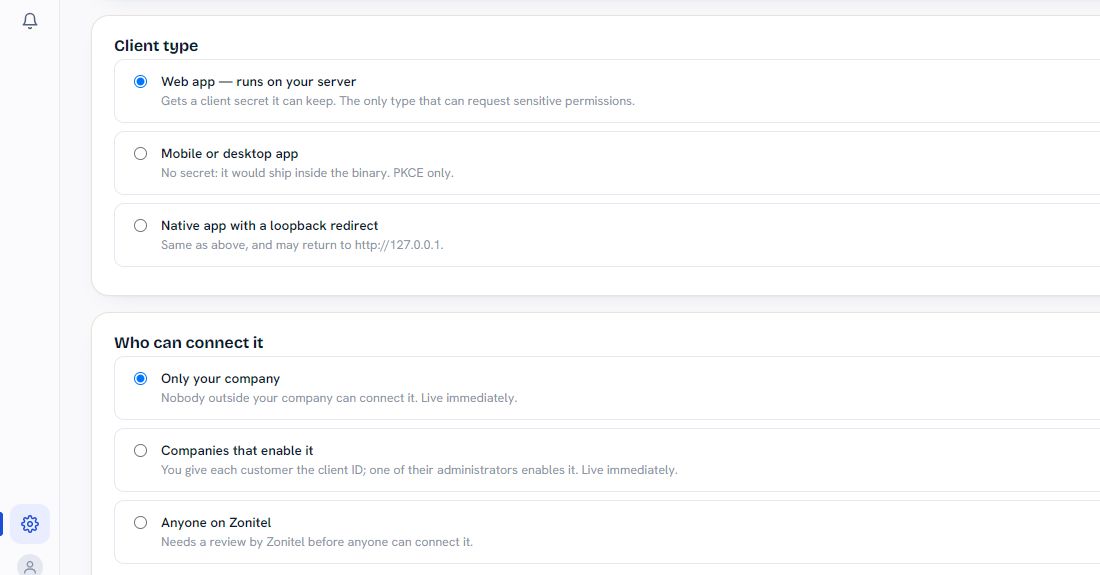
- Choose Client type. A server-side Web app can protect a client secret and is the type allowed to request sensitive permissions. A Mobile or desktop app uses PKCE without a secret. Native app with a loopback redirect also allows the documented local return address.
- Under Who can connect it, choose your audience: Only your company, Companies that enable it (a customer administrator enables your client ID), or Anyone on Zonitel (requires Zonitel review and a privacy-policy URL).

- Add the exact Redirect URIs. Standard redirects use HTTPS, with no wildcards or fragments. Use the loopback exception only for the matching native client type.
- Choose only the Permissions this app may request that the product needs. This list is a maximum: the user approves a subset, and their company roles can reduce access further. Reading history, recordings, transcripts and sending messages are separate permissions.
- Review the information, then select Register application. Store the assigned client ID and, for a server-side app, the client secret securely. The documentation says the secret is shown once. Never place it in a browser, mobile build, screenshot or support message.
2. Implement the connection flow
Your developer should expand OAuth — Connect with Zonitel in the API documentation for the full protocol. The essential sequence is:
- Start only when the user chooses to connect. Generate fresh, single-use
stateand a PKCE pair for each attempt. S256 is required; plain PKCE is not accepted. - Send the user to the documented authorization endpoint with the registered redirect and only the required scopes. On return, validate
stateand the exact issueriss; handle a denial instead of repeatedly reopening consent. - Exchange the authorization code promptly. Codes are single-use. Keep a server app’s secret on its server; a public client must not embed one.
- Use
GET /api/v3/oauth/contextto identify the connected company. Show its name before confirming the connection. Store an explicit mapping between that Zonitel company and the customer location in your system; email alone is not a reliable mapping. - Call the API using
Authorization: Bearer YOUR_OAUTH_ACCESS_TOKEN. Do not sendX-Client-Idor a companyclient_idin an API request body. OAuth gets the company from the grant; those extra selectors are rejected with HTTP 400. - Refresh according to
expires_inand replace the stored refresh token every time. Coordinate refreshes so an old token is never reused: replay can revoke the whole grant. Treat access tokens as opaque and keep tokens out of URLs and logs.
The OAuth application’s client ID identifies the application during authorization. It is not the company identifier used by a private integration.
3. Resolve access issues and disconnect safely
reason=not_granted: the user did not approve that scope. Reconnect and request it only if the feature needs it.reason=role_reduced: the user’s current company roles do not allow the action. Ask their administrator to review access; repeatedly reconnecting will not fix it.invalid_grant: the grant was revoked or the token/code is no longer usable. Start a fresh user-approved connection.invalid_client: check the registered client details and application status before retrying.- The app list will not load: confirm the account and location, reload once and contact support if the error persists. Do not replace OAuth tokens with private credentials to bypass it.
Users can review their authorizations in Account activity → Connected apps. Developers should revoke the refresh token through the documented revocation endpoint when their customer disconnects. For exact endpoints, request fields and retry rules, use the current OAuth reference.
Related guides
Private Integrations · Calls and contact history · SMS and MMS API · WhatsApp API
Need help?
Call, text or WhatsApp (833) 966-4835, or email info@zonitel.com. Share relevant examples privately; never include passwords or verification codes.