Connect a Voice Agent to Your Phone Number and Call Flow
Send incoming calls to the receptionist’s extension and verify the route without confusing caller ID with call routing.
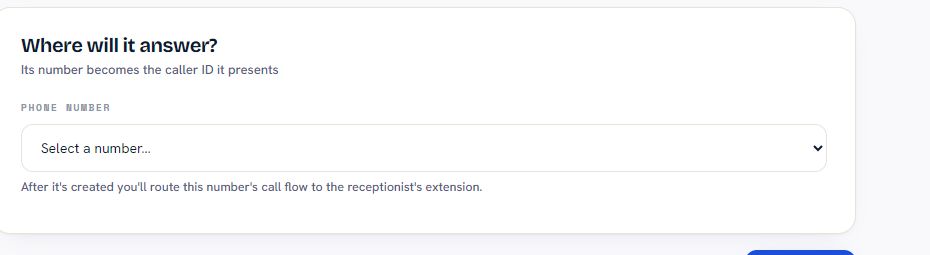
The phone number selected in Where it replies supplies the receptionist’s caller ID. The setup screen explicitly requires a separate step: route the number’s Call Flow to the receptionist’s extension after creation.

1. Identify the receptionist’s extension
Complete the agent setup and obtain its assigned extension. If creation has not completed or the extension is unavailable, resolve that first. Do not guess an extension or select a similarly named person.
2. Open the intended call route
- Open Settings → Phone Numbers and find the number customers call.
- Select Call Flow for that number.
- Review its existing destination before changing anything. Decide whether the receptionist should answer every call, a menu choice or only a specific hours branch.
3. Choose the appropriate placement
- Direct: use Select Action for Incoming Calls on the number’s main section. For an existing destination, the pencil opens Choose a destination.
- Only outside business hours: keep the number directed to the relevant Business Hours rule and place the receptionist on its closed-hours branch.
- A menu option: keep the number’s existing route to the Phone Menu (IVR) and use the receptionist’s extension as the intended option’s destination.
Find the assigned receptionist extension in the destination selector and save the intended route. If it is not available, ask support to check the agent’s readiness and routing connection before changing the number.
4. Test from outside the system
Call the business number from another phone and follow the exact route a customer would use. Check that the expected receptionist answers, the correct business name is spoken and any menu or hours rules still work.
Test appointment actions and messages separately. Keep a record of the previous destination so you can restore it if the test fails. Before pausing or removing a receptionist, first review every route that sends it calls and provide a working alternative.
Related guides
- Voice Agents: Choose the Right Virtual Receptionist
- Create a Voice Agent for Your Business
- Hand Over an AI Conversation to Your Team
Need help?
Call, text or WhatsApp (833) 966-4835, or email info@zonitel.com. Share relevant examples privately; never include passwords or verification codes.